Kapta · 15/09/2026
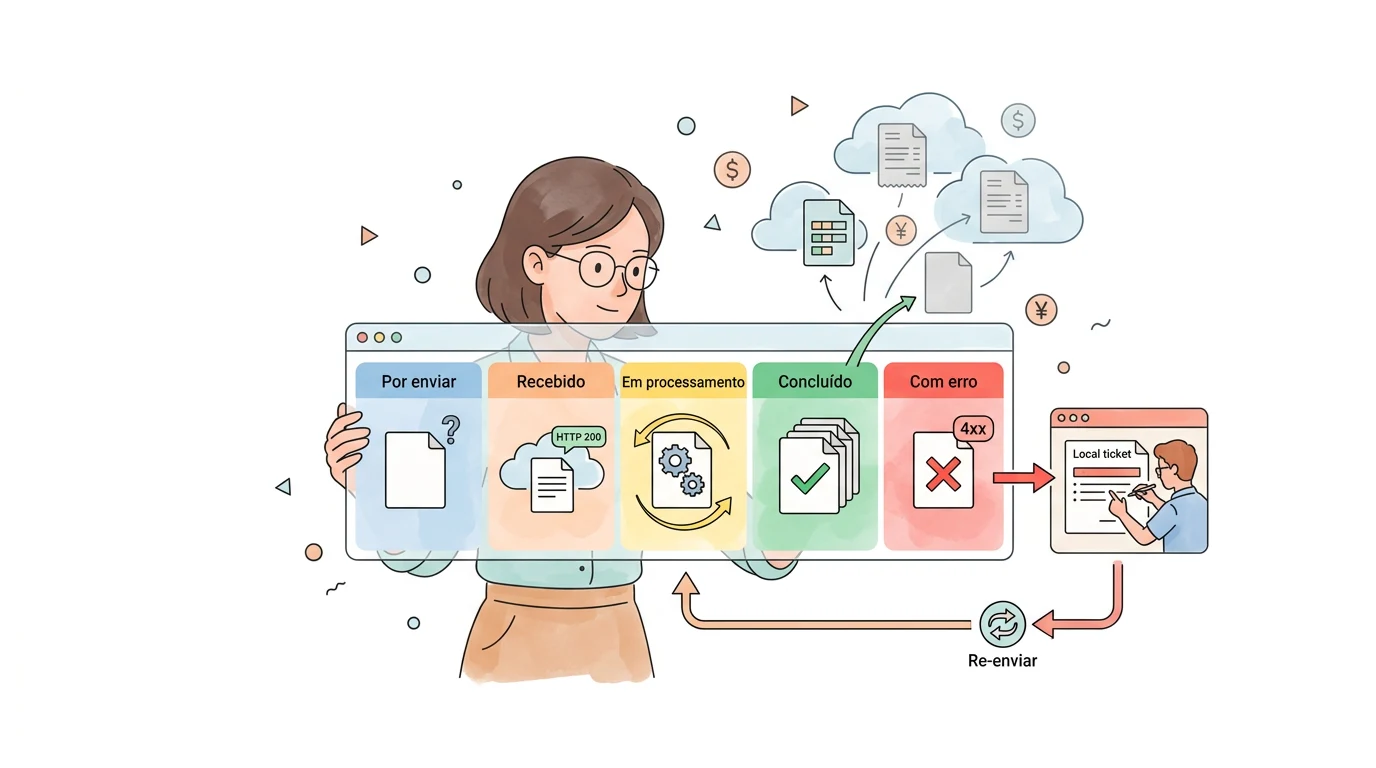
An HTTP 200 response from NTAK acknowledges receipt but does not guarantee successful processing. Follow the result using its processing identifier. TSS v104 specification.
What should a monitoring dashboard show?
As a project requirement, ask for clear states: awaiting submission, received, processing, completed and failed. Each state should show its latest update and an investigation reference. A green indicator based only on Internet connectivity does not explain a ticket's status.
What if only some records fail?
Processing can be partial. Use individual results to correct failures and avoid repeating records already processed. Assign someone to follow the recovery.
Which references make troubleshooting easier?
Build a traceable chain linking the FareHarbor booking, local ticket, usage event and submission operation. Use technical identifiers and useful error messages. Keep personal data in diagnostic logs to what is necessary and define who can access it.
Who should receive an alert?
Agree responsibilities across operations, the ticketing supplier and the integration team. A configuration error may need a different response from a temporary interruption. When assessing the workflow with Kapta, include failure examples, recovery criteria and an owner who confirms that the connection is working again.
